
Why would we want Pantone Connect?

With this blog post, I’ll give an overview of the Pantone Connect extension. The most useful feature of this extension is ability to convert Pantone colors directly in your Adobe application. There are two reasons I thinks it’s a good time to write about it. 1. It’s Free until 1 of July Due to COVID-19 […]
Templates save time and keep consistency throughout project
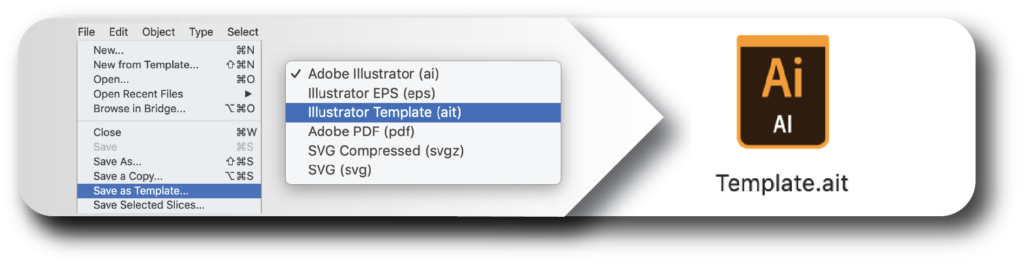
By creating and using templates in Adobe Illustrator you’ll save time and keep consistency throughout your project. Good templates can be very beneficial for your workflow. Designers, as well as a lot of other people, prefer visual information. So I decided to make a one page visual PDF for some of my blog posts. You […]
Smart Adobe Illustrator tip: Make a Custom Default Graphic Style
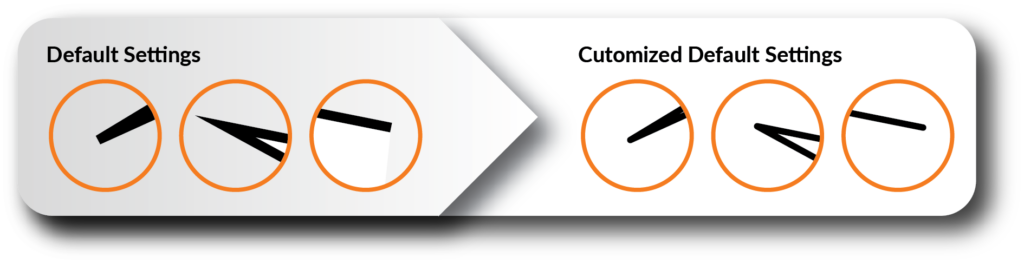
In this blog post I want to show how to create your own customized Default Graphic Style. This way you can assign the custom style to a path just by pressing D-key. Designers, as well as a lot of other people, prefer visual information. So I have made a one page visual PDF for some […]
Easy Way to Add Effects to Editable Text Using the Appearance Panel

In this blog-post, I’ll show the easy way to add effects to editable text. By using the Appearance panel you can keep your text editable while still adding effects. It will give you a lot of flexibility to work with it. Many times I’ve been asked to show some Adobe trick again and again […]
Artificial intelligence vs Photoshop: Quick experiment with upscaling of a product photo

There is a big focus in our days on AI: How it works? What can we use it for? My husband, Esben, works with combining chemistry with AI and has his own blog (Danger! Nerdy stuff!). Together we decided to make a little experiment, and test if AI can enlarge a product photo better than […]
Margaret O`Rorke: Ceramics Artist, who brings light to life

Margaret O’Rorke is one of the artists and a person that I really admire. I was lucky to meet and work with Margaret for five month in her studio in Oxford. It was a time with a lot of learning and I got insight into her way of working with material and form. I saw […]
Improve your Workflow by recording an Action to run your Custom Script

Actions can significantly improve your work flow and speed up design process. So today I’ll talk about how to make you custom scripts works as an Action. This is just amazing and I’m sure you will love it. The picture below shows a step by step instruction and you can download it here completely free […]
Simple trick to merge colors in Adobe Illustrator
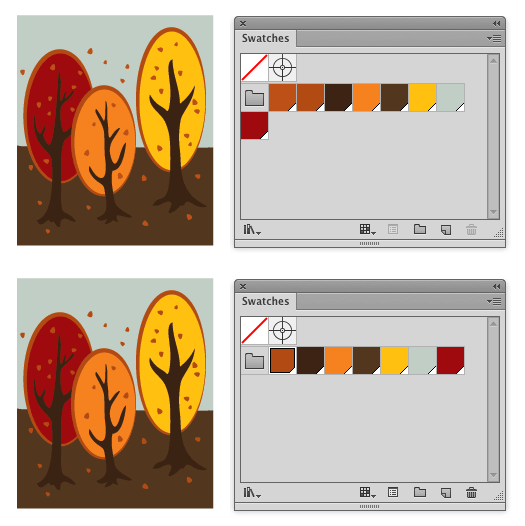
Hi Today I will show you a simple trick about how to merge colors in the Illustrator swatch palette. Usually I use it if I can see, that there are two almost similar colors in my artwork. Sometimes also for other purposes, but more about this later. It really depend of the specific artwork.As a […]
Process, Global and Spot colors in Adobe Illustrator
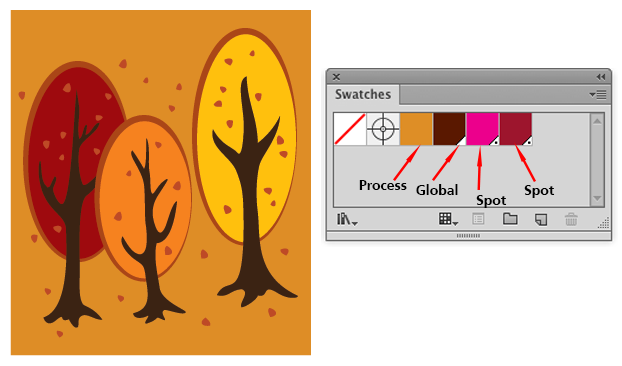
Hello again, Here on Productivista I want to make a series of blog posts dedicated to the theme: Changing colors in Adobe Illustrator. First I want to make a brief introduction to the differences between Process, Global and Spot colors. I´m one of these persons, who loves autumn. That´s why I created an autumn inspired […]
How to create a seamless pattern (old fashioned way)

To my followers, welcome back. In this post I will show how to create a seamless pattern in Adobe Illustrator. Adobe introduced a new Pattern Options Dialog back in Illustrator version CS6. Users of Adobe Illustrator were happy about this new feature and in forums people commented how difficult it was to design patterns before that. […]